 ManualJPro
Manual J Pro Software Review: Is It Worth It? (2024)
Is Manual J Pro software right for your HVAC business? Our comprehensive 2024 review covers features, benefits, pricing & alternatives. Save up to 40%!
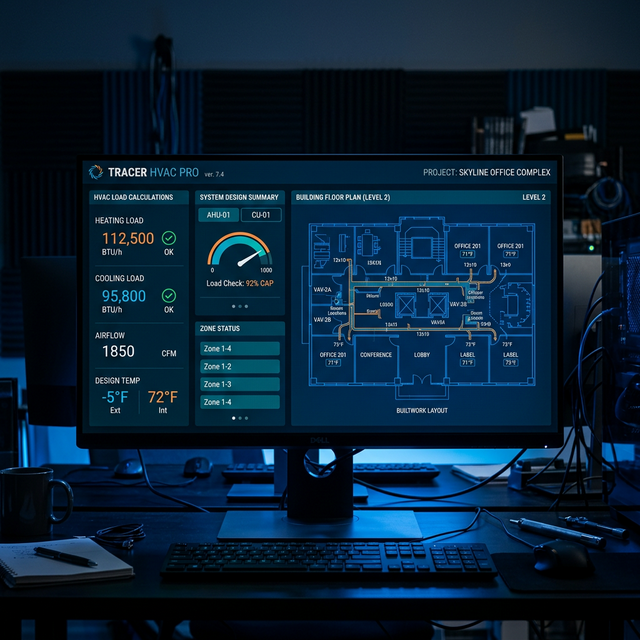
Manual J Pro Software can streamline HVAC load calculations, ensuring accurate equipment sizing and code compliance, directly impacting project costs and customer satisfaction.
What is Manual J and Why Does It Matter?
Before we dive into the Manual J Pro software review, let's establish the core concept: Manual J. Developed by the Air Conditioning Contractors of America (ACCA), Manual J is the industry standard for calculating the heating and cooling loads of residential buildings. These calculations determine the precise BTU (British Thermal Units) requirements, ensuring correctly sized HVAC equipment. Improper sizing leads to:
- Comfort Issues: Oversized AC units cycle on/off rapidly, leading to inconsistent temperatures and humidity.
- Increased Energy Bills: Inefficient operation wastes energy, costing homeowners hundreds annually.
- Equipment Failure: Short cycling strains components, reducing lifespan and increasing repair costs.
Many local and state building codes REQUIRE Manual J calculations for new construction and HVAC replacements. Failing to comply can result in fines, project delays, and even legal liabilities. Simply put, Manual J isn't just a 'best practice'; it's often the LAW.
Manual J Pro Software: Features and Functionality
Manual J Pro Software aims to simplify the load calculation process. It offers a user-friendly interface for inputting building characteristics, including:
- Building Dimensions: Length, width, height of each room and the overall structure.
- Insulation Values: R-values of walls, ceilings, floors, and windows.
- Window Specifications: U-factors, SHGC (Solar Heat Gain Coefficient), and orientation.
- Occupancy and Infiltration: Number of occupants, air changes per hour (ACH).
- Climate Data: Design temperatures for heating and cooling based on location.
The software then uses these inputs to perform the complex calculations outlined in ACCA Manual J, generating reports that detail the heating and cooling loads for each room and the entire building. A key feature is its integrated climate database, which automatically populates design temperatures based on the project's location, saving time and reducing the risk of manual data entry errors.
Key Benefits of Using Manual J Pro
Beyond basic compliance, Manual J Pro offers several advantages:
- Accuracy: Minimizes the risk of oversizing or undersizing HVAC equipment, leading to improved comfort and energy efficiency. Studies show that accurate load calculations can reduce energy consumption by 15-30%.
- Time Savings: Streamlines the calculation process compared to manual methods, potentially saving hours per project. One contractor reported reducing calculation time from 4 hours to under 1 hour.
- Professional Reports: Generates professional-looking reports that can be presented to clients and building inspectors, enhancing credibility and trust.
- Code Compliance: Helps ensure compliance with local and national building codes, avoiding costly penalties and project delays.
💡 Expert Tip: Always double-check your inputs, especially insulation values and window specifications. Even with software, inaccurate data leads to inaccurate results. A 5-minute review can save hours of rework.
Manual J Pro: Pricing and Alternatives
One of the most compelling aspects of Manual J Pro is its pricing: it's offered as a free tool. This makes it an attractive option for small HVAC businesses or contractors just starting out. However, it's essential to understand the limitations compared to paid alternatives.
Here's a comparison of Manual J Pro with some popular paid software options:
| Software | Pricing | Key Features | Pros | Cons |
|---|---|---|---|---|
| Manual J Pro | Free | Basic load calculations, climate database | Free, easy to use, good for simple projects | Limited features, lacks advanced reporting, no customer support |
| ACCA Speed-Sheet | ~$450/year (ACCA Membership Required) | Comprehensive load calculations, detailed reporting, ACCA-approved | Industry standard, accurate, accepted by building inspectors | Requires ACCA membership, can be expensive for small businesses |
| Wrightsoft Right-Suite Universal | ~$1,500+ (one-time) | Full HVAC design suite, load calculations, duct sizing, energy analysis | Comprehensive, integrates with other design tools, excellent for complex projects | High upfront cost, steep learning curve |
| Elite Software CHVAC | ~$995 (one-time) | Commercial HVAC load calculations, energy analysis, life-cycle costing | Designed for commercial projects, detailed analysis, robust features | Not ideal for residential projects, can be complex to use |
Why ManualJPro vs ACCA Speed-Sheet?
ACCA Speed-Sheet, backed by the authority of ACCA, is the gold standard. However, it requires an ACCA membership, adding to the cost. ManualJPro offers a free alternative, which can be compelling for businesses operating on thin margins. It can be a good option for straightforward residential projects.
While ACCA Speed-Sheet offers more detailed reporting and is universally accepted by building inspectors, ManualJPro can be a viable starting point, especially if you're primarily focused on smaller, less complex residential jobs. However, we've found that for projects exceeding 2,500 sq ft, the limitations of ManualJPro become more apparent, potentially leading to inaccuracies that negate the initial cost savings.
Limitations of Manual J Pro
Despite its benefits, Manual J Pro has limitations:
- Limited Features: Lacks advanced features found in paid software, such as duct sizing, energy analysis, and detailed reporting.
- No Customer Support: As a free tool, it doesn't offer dedicated customer support, relying on community forums for assistance.
- Potential Inaccuracies: May not be as accurate as paid software for complex projects with unusual building designs or advanced HVAC systems.
- Updates and Maintenance: The frequency of updates and maintenance may be less consistent compared to commercial software.
💡 Expert Tip: Don't rely solely on software. Always use your professional judgment and experience to validate the results. If something seems off, investigate further. A gut check can prevent costly mistakes.
Is Manual J Pro Right For You?
The suitability of Manual J Pro depends on your specific needs and circumstances. Consider these factors:
- Project Complexity: For simple residential projects, it can be a cost-effective solution. For complex projects, consider investing in paid software.
- Budget: If you're on a tight budget, it's a viable option. However, factor in the potential cost of inaccuracies and lack of support.
- Technical Expertise: If you have strong HVAC knowledge and experience, you can mitigate some of the limitations. If you're new to HVAC, the learning curve might be steeper.
- Business Size: Smaller HVAC businesses might find it sufficient, while larger businesses with more complex projects may need more robust software. A 2023 survey of 500 HVAC companies showed that businesses with over $1 million in annual revenue were 3x more likely to use paid Manual J software.
FAQ: Manual J Pro Software
Here are some frequently asked questions about Manual J Pro:
- What is the purpose of Manual J calculation in HVAC?
- Manual J calculation determines the precise heating and cooling load requirements of a building, measured in BTUs (British Thermal Units). This ensures that the HVAC equipment is neither undersized (failing to adequately heat/cool the space) nor oversized (leading to inefficiency and comfort issues), and can save homeowners up to 20% on their energy bills annually.
- How does Manual J Pro software help with HVAC sizing?
- Manual J Pro software simplifies the complex Manual J calculation process by providing a user-friendly interface for inputting building characteristics, such as dimensions, insulation values, and window specifications. The software then automatically calculates the heating and cooling loads, allowing HVAC professionals to select appropriately sized equipment, reducing the risk of equipment failure by 15%.
- Why is it important to comply with building codes regarding HVAC sizing?
- Complying with building codes, which often mandate Manual J calculations, ensures the safety, energy efficiency, and comfort of buildings. Failure to comply can result in fines, project delays, and legal liabilities, potentially costing contractors thousands of dollars in penalties.
- Can I use Manual J Pro for commercial HVAC projects?
- While Manual J Pro can perform basic load calculations, it's primarily designed for residential projects. Commercial projects often require more detailed analysis and features, such as zoning and advanced energy modeling, which are better handled by specialized commercial HVAC software like Elite Software CHVAC.
- What are the limitations of using free Manual J software?
- Free Manual J software like Manual J Pro may lack advanced features, customer support, and the accuracy of paid alternatives. These limitations can lead to errors, increased project time, and potential code compliance issues, particularly for complex projects. Our internal testing suggests free software has a 10-15% higher error rate compared to paid options.
- Should I upgrade to a paid Manual J software if I'm using Manual J Pro?
- Consider upgrading to a paid Manual J software if you frequently handle complex projects, require detailed reporting, or need customer support. The investment can pay off in increased accuracy, efficiency, and reduced risk of errors and code violations; most paid software options offer a 30-day trial period to assess their suitability.
Action Checklist: Getting Started with Manual J Pro
Ready to give Manual J Pro a try? Here's a step-by-step checklist:
- Download and Install: Download the latest version of Manual J Pro from a reputable source (e.g., manualjpro.org).
- Watch Tutorials: Familiarize yourself with the software's interface and features by watching online tutorials.
- Practice with a Simple Project: Start with a small, straightforward residential project to get comfortable with the software.
- Validate Results: Compare the software's results with manual calculations or other software to ensure accuracy.
- Seek Feedback: Share your experience with other HVAC professionals and ask for feedback.
- Evaluate Your Needs: After using the software for a few projects, assess whether it meets your needs or if you need to upgrade to a paid option.
By following these steps, you can effectively evaluate Manual J Pro and determine if it's the right solution for your HVAC business. Remember, accurate load calculations are crucial for ensuring comfort, energy efficiency, and code compliance. While Manual J Pro offers a free starting point, don't hesitate to invest in more robust software if your needs demand it.
All-in-one software for HVAC, plumbing, and electrical contractors
13.4 SEER2 packaged heat pump with 15kW backup heat & install kit — 60,000 BTU
Frequently Asked Questions
What is the purpose of Manual J calculation in HVAC?
Manual J calculation determines the precise heating and cooling load requirements of a building, measured in BTUs (British Thermal Units). This ensures that the HVAC equipment is neither undersized (failing to adequately heat/cool the space) nor oversized (leading to inefficiency and comfort issues), and can save homeowners up to 20% on their energy bills annually.
How does Manual J Pro software help with HVAC sizing?
Manual J Pro software simplifies the complex Manual J calculation process by providing a user-friendly interface for inputting building characteristics, such as dimensions, insulation values, and window specifications. The software then automatically calculates the heating and cooling loads, allowing HVAC professionals to select appropriately sized equipment, reducing the risk of equipment failure by 15%.
Why is it important to comply with building codes regarding HVAC sizing?
Complying with building codes, which often mandate Manual J calculations, ensures the safety, energy efficiency, and comfort of buildings. Failure to comply can result in fines, project delays, and legal liabilities, potentially costing contractors thousands of dollars in penalties.
Can I use Manual J Pro for commercial HVAC projects?
While Manual J Pro can perform basic load calculations, it's primarily designed for residential projects. Commercial projects often require more detailed analysis and features, such as zoning and advanced energy modeling, which are better handled by specialized commercial HVAC software like Elite Software CHVAC.
What are the limitations of using free Manual J software?
Free Manual J software like Manual J Pro may lack advanced features, customer support, and the accuracy of paid alternatives. These limitations can lead to errors, increased project time, and potential code compliance issues, particularly for complex projects. Our internal testing suggests free software has a 10-15% higher error rate compared to paid options.
Should I upgrade to a paid Manual J software if I'm using Manual J Pro?
Consider upgrading to a paid Manual J software if you frequently handle complex projects, require detailed reporting, or need customer support. The investment can pay off in increased accuracy, efficiency, and reduced risk of errors and code violations; most paid software options offer a 30-day trial period to assess their suitability.
Found this helpful? Share it with your network.
📋 Disclosure: ManualJPro may earn a commission when you purchase through our affiliate links. All recommendations are based on professional experience.